![sparklearn_logo_2020_large_white-01 (1).png]](https://help.sparklearn.com/hs-fs/hubfs/sparklearn_logo_2020_large_white-01%20(1).png?height=50&name=sparklearn_logo_2020_large_white-01%20(1).png)
An eLearning Package is a piece of content that is created outside of SparkLearn® in an eLearning authoring tool. eLearning Packages are exported as a zip file with xAPI metadata (tincan.xml) and uploaded to the SparkLearn CMS. Like articles, they can be related to quizzes, flashcards and tips.
Visual Guide
- Select Content from the menu on the left of the screen
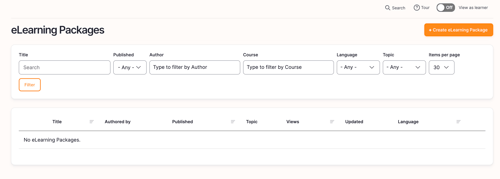
- Under Content, select eLearning Packages
- Select Upload eLearning Package
- Select the Topic you want the eLearning Package to fall under
- Add a Title for your eLearning Package
- Choose a Featured Image to represent your eLearning Package
- Add a Description to your eLearning Package
- Add relevant Tags to help users find your eLearning Package
- Choose an eLearning Package to upload
- Choose the Difficulty level of your article
- Select Groups to assign the content to
- Relate Quizzes, Flashcards and Tips to the eLearning Package
- Content Managers only: Select Scheduling Options in the settings section and select the Date and Time you want your content published on
- Owners only: Select Promotion Options in the settings section and check Promoted and/or Sticky to increase the visibility of content to your learners
- Promoted - content appears in all users’ For You tab until they have completed it or the promotion is removed
- Sticky - content appears in the Trending tab on the learner's dashboard and at the top of the list when viewing a tag
- Check Published to publish the content now or leave unchecked to save as a draft or use scheduling options
- Once you're finished, choose to Save or Preview the content
Still can’t find what you're looking for? Contact Support