![sparklearn_logo_2020_large_white-01 (1).png]](https://help.sparklearn.com/hs-fs/hubfs/sparklearn_logo_2020_large_white-01%20(1).png?height=50&name=sparklearn_logo_2020_large_white-01%20(1).png)
To export the contents of an article to a Word document for review or archiving, follow the steps below.
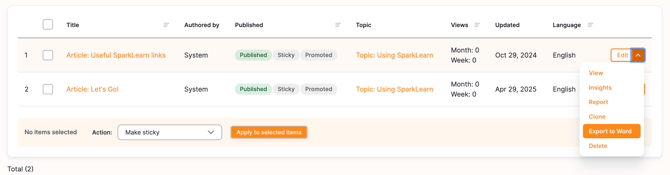
Choose the edit menu from the Articles page and choose "Export to Word". The file will download with the article Url, Title, Topic, Tags, Description and text/images from the article body.
Notes:
- All basic paragraph types should export as text blocks so they won’t be styled the same but the text will be maintained.
- Feature images should appear as an image in the word document
- Video - attempts to export as a link to the video. This link is the link provided by the user so it may or may not depending on the service be openable as a standalone link. Some of the services give an embedded link that can’t be visited directly and must be embedded in a page to play but the url will be the url given by the user when they created the page so they can check it is accurate.
- Audio files should appears as links
- Images, image titles, image captions and alt text should work. All images will be displayed at a fixed size. Image hotspot text will be exported but the hotspots on the image won’t work
- Text paragraph styling should be maintained. So bold, italic, underline, strikethrough, text color should be maintained.
- Styling in other paragraph types will be different. Callout paragraphs for example will just list in text what type they are.
- Accordions and Slideshows will export as text blocks alongside associated images
- Limited support for nested items inside of accordions and slideshows e.g. tables, lists.
- Checklists should appear as lists or lists with checkbox symbol beside them. The checkbox is sometimes missing if the checkbox is nested inside another item
- Flash, Tip, and Quiz cards will appear as simple text paragraphs with very little styling
- Quizzes will list the answer choices and correct response(s).
- Internal and external links should become clickable links in the word document export.
- Tables are supported but nested table support is limited. In testing nested tables often were rendered incorrectly in word.
- Tables nested inside of lists and lists nested inside of tables have limited support.
- Embed and custom html have limited support and depend entirely on what they are being used for.