![sparklearn_logo_2020_large_white-01 (1).png]](https://help.sparklearn.com/hs-fs/hubfs/sparklearn_logo_2020_large_white-01%20(1).png?height=50&name=sparklearn_logo_2020_large_white-01%20(1).png)
To support user management, Content Managers have the ability to export a CSV list of all SparkLearn users. The exported list of users will contain the following fields:
- Name
- Role(s)
- Group(s)
- Interest(s)
- Created - the date the account was created
- Updated - the date the account was last modified
- Last Accessed - the date the account was last used
- Status - either "Blocked" or "Active"
- View - a URL to the account's settings
- Select Users from the menu on the left of the screen
- Select Export to generate and download a CSV of all users
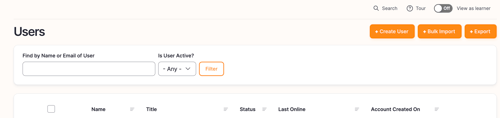
This guide shows how to export a CSV of existing users. If you want to import new users with a CSV, click here.
Still can’t find what you're looking for? Contact Support