![sparklearn_logo_2020_large_white-01 (1).png]](https://help.sparklearn.com/hs-fs/hubfs/sparklearn_logo_2020_large_white-01%20(1).png?height=50&name=sparklearn_logo_2020_large_white-01%20(1).png)
A Test is a series of Quiz questions that are used to evaluate the learner's knowledge of information in a Course. Tests are scored by percentage and the pass mark is set by the author. Learners may retake a test if they do not pass the first time.
Tests are displayed as a part of a Course.
Tests are comprised of Quizzes. Click here to learn how to Create a New Quiz.
- Select Collections from the menu on the left of the screen
- Under Collections select Courses
- Choose the Title of an existing Course or select Create New Course
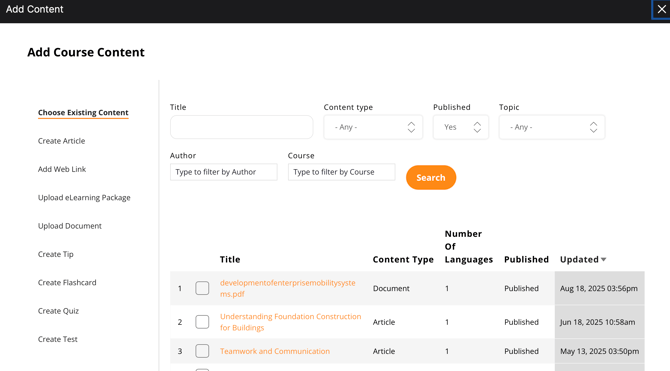
- Under the Learning Content field select Add Content
- Select the Create Test tab in the Add Learning Object window
- Add a Title
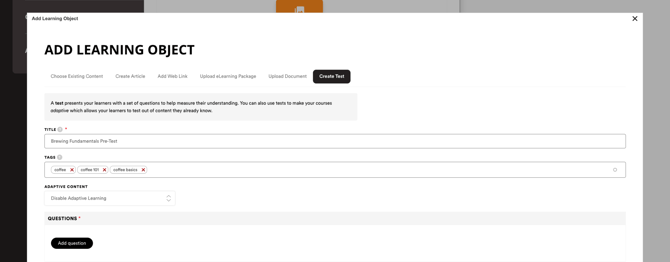
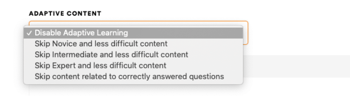
- Choose if you would like to use Adaptive Content
- Disable – course content will not change based on Test score
- Enabled – content of a chosen difficulty will be skipped based on Test score (use this if the Test will be used as a Pre-test for the Course
- Select Add question
- Check the boxes next to Existing quizzes that you want to include or create a New quiz
- Select Add quiz to add the questions to your Test
- Move and drag the quiz questions to put them in the order you want them to appear in the Test
- Enter a percentage to set the Pass Mark (For example, entering 70% will require the learner to have a 70% or higher score to pass.)
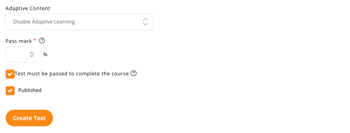
- Check Published to publish the Test
- Select Create Test to finish
Still can’t find what you're looking for? Contact Support