![sparklearn_logo_2020_large_white-01 (1).png]](https://help.sparklearn.com/hs-fs/hubfs/sparklearn_logo_2020_large_white-01%20(1).png?height=50&name=sparklearn_logo_2020_large_white-01%20(1).png)
To support content management and determine who can see what information, content can be managed within the Groups menu. In addition to adding content as defined below, you can delete content from a group as well.
- Select Groups from the menu on the left of the screen
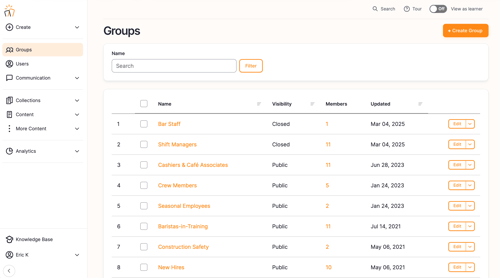
- Select the Name of the Group you want to add content to from the dashboard
- From the Edit Group screen select the Content tab
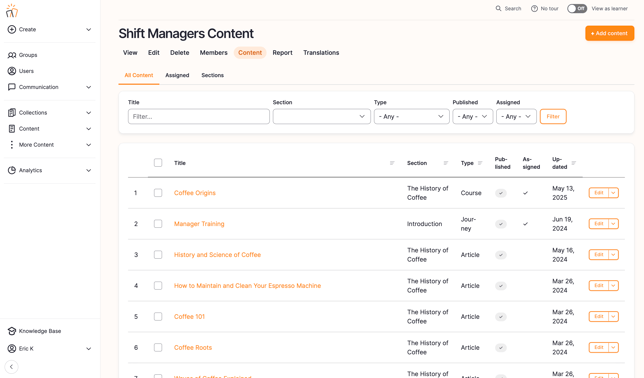
- Select the +Add content button
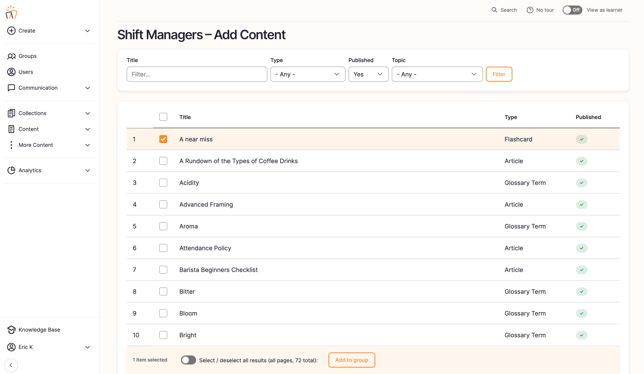
- Use the filters to find a specific piece of content by Title, Type, or Topic
- Check the boxes next to pieces of content you want to include
- Select Add to Group
Still can’t find what you're looking for? Contact Support