![sparklearn_logo_2020_large_white-01 (1).png]](https://help.sparklearn.com/hs-fs/hubfs/sparklearn_logo_2020_large_white-01%20(1).png?height=50&name=sparklearn_logo_2020_large_white-01%20(1).png)
A Checklist is an interactive element that can be added to the body of an article. Checklists can be used as reminders or to track progression as learners engage with tasks or activities. Checklist persistence can be customized so you can restart a checklist every time you open the article, use it to track daily tasks or keep a running list.
Visual Guide
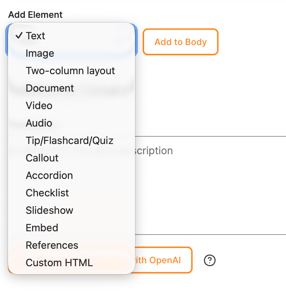
- While Creating or editing an Article, selectChecklist from the drop-down menu in the body portion of the article creation screen
- Give the checklist a title (this is optional)
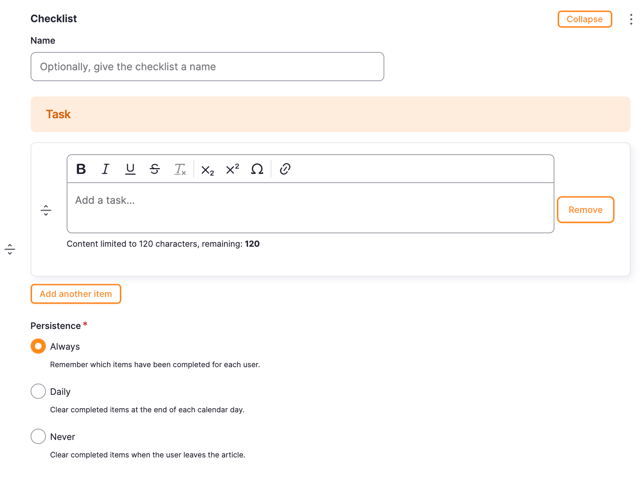
- Add tasks to the checklist using the text field(s) – formatting of the text is an option (bold, italicized, underlined, subscripted, or superscripted)
- Add a link to a task by selecting the link icon and adding the URL in the text field
- Select Add Another Item to add additional items to the current checklist
-
- Always – completed tasks are remembered by the system
- Daily – completed tasks are unchecked by the system at the end of each day
- Never – completed tasks are unchecked by the system when the user leaves the articleChoose the Persistence of checked items from within the checklist; in other words, how long do you want the system to remember your checklist data?
-
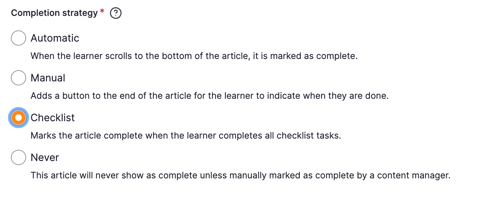
- Automatic - when the learner scrolls to the bottom of the article
- Manual - when the learner selects the Done button at the bottom of the article
- Checklist - when the learner completes all checklist tasks
- Never - when a content manager manually marks the article complete for a learner
Still can’t find what you're looking for? Contact Support